[PS] C:\Users\ChichaevMA\Desktop>Get-Mailbox MendeEb [PS] C:\Users\ChichaevMA\Desktop>Set-mailbox MendeEB -PrimarySmtpAddress _Elena.Mende@fbk.ru -EmailAddressPolicyEnabled $false [PS] C:\Users\ChichaevMA\Desktop> Установка PrimarySmtpAddress в Exchange через PowerShell Автор: admin | 23.09.2015 1 комментарий Столкнулся с тем, что не могу через Exchange Management Console поменять первичный smtp адрес Заходим в Exchange Powershell и смотрим что с ящиком: [PS] C:\Windows\system32> get-mailbox a.petrov | fl name, alias, primarysmtpaddress, emailaddresses Name : Петров Андрей Вячеславович Alias : A.Petrov PrimarySmtpAddress : A.Petrov2@domain.ru EmailAddresses : {smtp:a.petrov@domain.ru, SMTP:A.Petrov2@domain.ru} Для смены праймари выполняем следующее set-Mailbox a.petrov -PrimarySmtpAddress a.petrov@domain.ru Проверяем, готово! В случае ошибки WARNING: Couldn’t update the primary SMTP address because thi...
Сообщения
Использование Simple Display Name в Exchange Server для отправки сообщений в Интернет с другим именем в поле From

Использование Simple Display Name в Exchange Server для отправки сообщений в Интернет с другим именем в поле From: В этой статье мы рассмотрим одну интересную возможность Exchange Server, которая позволяет с помощью Simple Display Name изменять имя пользователя при отправке сообщений за пределы организации Применимо к Exchange 2003, 2007, 2010, 2013, 2016 В некоторых случаях возникает необходимость отправлять сообщения в интернет (за пределы организации) с другим отображаемым именем. Например, внутри компании Display Name помимо имени пользователя может содержать дополнительную информацию, облегчающую взаимодействие сотрудников. Например, встречаются полные тёзки и отличать их можно по дополнительному указанию должности в отображаемом имени: Это хорошо для взаимодействия внутри компании, но совсем не годится для отправки писем с таким именем за пределы организации. Довольно часто встречается и другая ситуация. Display Name заполняется, как ФИО сотрудника на русском язы...

QUEST MNE (Migrator for Notes to Exchange) Rerequestives
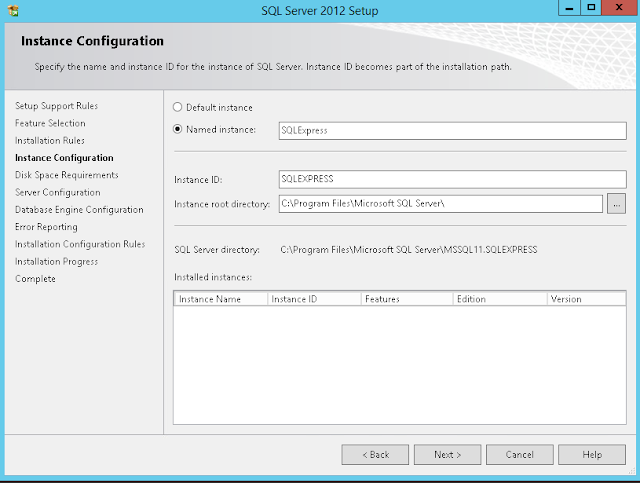
1. AD account на корневой домен (Хотя Exchange в дочернем) 2. OS Windows 2012 R2 Region Loction - Home location US Format - English US Administrative System locale - English US Copy Settings to Current User 3. Notes а. Notes 9.0.1 Single-User Setup б. Configured - user.id in LocalDomailnAdministrators group 4. Domino server 9.0.1 FP7 on same test lab mashine 5. SQL MS SQL 2012 ENG Express TCP/IP ON 1433 (Sql Mangement Console) 6. OutLook 2013 32 bit
Quest MNE: Отключение DEP Data Execution Prevention в windows 2012R2
bcdedit.exe /set {current} nx AlwaysOff https://social.technet.microsoft.com/Forums/ru-RU/a7b4abbd-7bf4-432d-877d-19c0f3a267c2/108210721082-108610901082108311021095108010901100-dep?forum=virtualizationru
Quest MNE - подготовка AD, Lotus, админские учетки Установка прав админа на все mailbox database Exchange, SQL
IMPORTANT: You must use different user accounts for the Exchange Account and the Active Directory Account. You must not use one account for both purposes. Using one account for both purposes results in conflicting mailbox permissions that prevents MNE from being able to access the exchange mailboxes when migrating mailbox data. AD account: Active directory account An AD admin account is configured for access to Active Directory containers and objects, corresponding to Migrator for Notes to Exchange’s AD Information screens. This must be a domain user account with full access to the target OU. If the contacts will be merged with existing Active Directory user objects, the account must have full control of the OUs/containers where the AD user objects currently reside. This ensures Migrator for Notes to Exchange has sufficient access to properly join to the merged user objects, and prevents the creation of duplicate contacts. To set AD container permissions in Exchange 20...
Set-AdServerSettings -ViewEntireForest $true Прерывание сценария при установки первого сервера Exchange 2016 в дочерний домен
https://social.technet.microsoft.com/Forums/ie/en-US/9a585e65-563d-4fa6-bca6-a5a59b379c3f/install-exchange-2016-cu2-fails-in-child-domain-arbitration-mailbox?Ask a question ign in to vote I know this is a *very* late reply, but just wanted to add my 2 cents. I ran into the same error during installation of Exchange 2016 CU2 in a child domain, with an existing Exchange 2010 installation. The problem is that Get-Mailbox -Arbitration doesn't return any results, as they are located in the root domain - this is by design. The solution was to run Set-AdServerSettings -ViewEntireForest $true . Now run Get-Mailbox -Arbitration again, it should show the bb58... system mailbox and 3 others. If so, run setup again. Asked by: 25 Points Top 30 LiveBTW83 Joined Dec 2012 4 LiveBTW83's threads Show activity Install Exchange 2016 CU2 fails in Child Domain - Arbitration mailbox Exchange Server >...